
A daycare security system is an integrated set of access control, video surveillance, visitor verification, and emergency-response tools that controls who enters a childcare center and accounts for every child inside it. The right system does two jobs at once. It keeps unauthorized adults out, and it proves to parents and licensors that supervision is tight. At Safe and Sound Security, we bring 19+ years of commercial and government security integration and 20,000+ protected locations to childcare centers, installing cameras, access control, intercom, alarms, and fire under one contractor.
This guide breaks a childcare security system into seven core layers, explains the licensing and camera-law rules that shape it, and shows how to choose a setup that fits your center’s size and budget.
Key Takeaways
- No federal law dictates how daycare doors must be secured. Requirements come from state licensing rules, local fire codes, and federal background-check law, not a single national security standard.
- Seven layers work together: access control, video intercom, cameras, pick-up verification, visitor check-in, panic and lockdown, and code-compliant fire egress. Gaps between them are where security fails.
- Pick-up verification is the layer unique to childcare. Authorized-adult lists and custody enforcement matter more in a daycare than in almost any other building type.
- Cameras are a common-area question. They are allowed in classrooms, hallways, and playgrounds with disclosure, never in bathrooms or changing areas, and a small number of states have begun to regulate or require them.
- Integration beats piecemeal. Cameras, access control, intercom, and alarms on one platform close the coordination gaps that single-product vendors leave behind.
The 7 Core Layers of a Daycare Security System
A complete daycare security system combines seven layers, each handling a different threat. The first three control who gets through the door, the next two verify identity and track movement, and the last two handle emergencies. Each layer pairs with specific hardware, from entry keypads to code-compliant fire-door hardware.
| Layer | What it does | Typical hardware |
|---|---|---|
| Access control | Locks entrances and limits who can open them | Keypads, fobs, mobile credentials, biometric readers |
| Video intercom | Verifies a visitor before the door is unlocked | Door station with camera, indoor answer point |
| Video surveillance | Records entrances, rooms, and the playground | IP cameras, cloud or on-site recording |
| Pick-up verification | Confirms only approved adults collect a child | Digital sign-out, authorized-adult list, photo ID |
| Visitor management | Logs every parent, vendor, and guest | Digital check-in, visitor badges |
| Panic and lockdown | Triggers alerts and locks the building fast | Wireless panic buttons, remote-lock app |
| Fire and egress | Meets fire code without trapping anyone inside | Fire alarm panel, code-compliant door hardware |
Access Control and Keyless Entry
Access control keeps the front entrance locked 24/7 and decides who can open it. Keypads, key fobs, mobile credentials, and biometric readers replace physical keys that get lost, copied, or handed off. Cloud-based access control systems let a director add or revoke a credential from a phone the moment a staff member leaves or a custody order changes.
Timed access adds a scheduling layer. Exterior doors can stay locked around the clock, or auto-unlock only during peak drop-off and pick-up windows so parents are not buzzed in one at a time. Inside the building, infant and toddler rooms can be zoned as separate access points so only assigned caregivers reach them. We install brand-agnostic platforms such as Brivo, Avigilon Alta, Salto, and HID, matching reader and credential type to how a center actually operates rather than defaulting to one product.
Video Intercom and Buzz-In Verification
A video intercom lets staff see and speak to a visitor before releasing the door. When someone rings the front entrance, a staffer views them on a screen, confirms who they are, and unlocks the door remotely if they belong. This is the single most common entry setup in childcare, and it works only when a staff member is watching the screen.
That staffing reality is the honest tradeoff. At peak drop-off, a small center may not have anyone free to watch the door, which is why many pair the intercom with timed auto-unlock or a keypad credential for known parents. We install video intercom hardware, including Aiphone, the most-specified intercom line in school security bids, and integrate it with the same access control that runs the doors.
Video Surveillance and Camera Placement
Cameras cover entrances, hallways, parking areas, and outdoor playgrounds, never bathrooms or diaper-changing areas. Placement follows the child’s path through the day: the front door, the sign-in area, each classroom entrance, and the gate to the play yard. Security cameras also create a record that resolves the disputes daycares deal with most, from a pick-up disagreement to a question about how an injury happened.
Some centers offer parents a live classroom feed through a secure portal, which builds trust but raises the privacy and consent questions that state camera laws address. Video analytics can flag when someone approaches a restricted exterior gate or a door that should stay closed. We install platforms such as Verkada, Axis, and Rhombus, and can add a parent-viewing option where a center wants one.
Pick-Up and Drop-Off Verification
Pick-up verification confirms that only pre-approved adults collect a child, and it is the layer that sets childcare apart from every other building type. Young children are especially vulnerable in custody and abduction situations. Federal research on family abductions found that 44% of victims were younger than age 6, according to the Office of Juvenile Justice and Delinquency Prevention.
A strong setup ties three things together: a digital authorized-adult list for each child, a photo-ID check at release, and access credentials that can be revoked the instant a custody order changes. When a parent loses pick-up rights, the system removes their credential and flags their name at the door rather than relying on a staff member to remember. This is where access control and check-in software have to talk to each other, and it is the gap most piecemeal setups leave open.
Visitor Management and Digital Check-In
Visitor management logs every parent, vendor, and guest who enters the building. Digital sign-in replaces the paper clipboard with a timestamped record of who arrived, who they were there to see, and when they left. For parents, the same system handles attendance and drop-off, giving the center an exact account of which children are present at any moment, which matters most during an evacuation.
Childcare-specific software such as Procare and Brightwheel handles the attendance and parent-communication side of check-in. A security system handles the hardware layer underneath it: the doors, the cameras, and the access credentials. We integrate visitor management, including Verkada Guest, into the command center so the sign-in log, the door, and the camera view live in one place instead of three disconnected tools.
Panic Buttons, Lockdown, and Emergency Alerts
Panic and lockdown tools let staff call for help and secure the building in seconds. Wireless panic buttons, whether wall-mounted or worn as a badge, notify staff and can alert local responders without a caregiver leaving the children. A remote-lockdown feature lets an administrator lock every door from a phone the moment a threat appears. We install alarm and panic hardware and integrate mass-notification tools such as CENTEGIX into the command center.
One point of confusion is worth clearing up. Alyssa’s Law, which requires silent panic alarms tied to law enforcement, applies to K-12 public schools, not licensed daycares. If your center is part of a school campus, see our school security systems guide for how that mandate works. A standalone daycare is not covered by it, though the same panic-button technology still applies.
Fire Alarm and Code-Compliant Egress
Fire safety in a daycare is governed by fire code, and the rule that catches operators off guard is about egress. Childcare centers are subject to state and local fire codes that set alarm, occupancy, and exit requirements varying by building size and the ages of the children in care. This is a code question decided at the state and local level, not a single federal law, so the specifics depend on your jurisdiction.
The egress rule shapes every access-control decision. To comply with fire codes, doors should never be locked from the inside, so any electronic lock must release freely for exit even while it blocks entry, per guidance from childcare loss-control specialists at West Bend Insurance. We install fire alarm systems alongside access control so the two are designed together and a lockdown never conflicts with a fire evacuation.
Daycare Security Compliance: Licensing, Background Checks, and Camera Laws
Most daycare security requirements come from three places: state licensing rules, federal background-check law, and a small but growing set of state camera laws. No single federal statute tells a center how to secure its doors, so compliance means meeting each of these separately. This is the layer that vendor product pages skip, and it is where a center gets a license renewed or fails an inspection.
State Licensing and Child-to-Staff Ratios
State licensing agencies set the supervision rules that a security system has to support. Every state licenses childcare centers and enforces child-to-staff ratios, which cap how many children one caregiver can watch. Those ratios drive design decisions: attendance tracking has to account for every child against the ratio, and access zoning has to keep group sizes and rooms separated the way the license requires. A system that cannot produce an accurate, real-time head count by room is a licensing liability before it is ever a security gap.
Staff Background Checks Under CCDBG
Federal law requires a criminal background check on every childcare worker. Under the Child Care and Development Block Grant (CCDBG), programs must run a check before a staff member is hired and then at least once every five years, according to Childcare.gov. The check includes an FBI fingerprint search and a search of the National Sex Offender Registry, and it applies to directors, teachers, caregivers, drivers, and any adult who works in or lives in a home-based program.
Background checks are a personnel control, but they connect to the physical system. The same access platform that grants a new hire a door credential should not issue one until the check clears, and it should pull the credential the day someone leaves.
Camera Laws and Privacy
Camera use in daycares is legal in common areas with disclosure, and a small number of states have started to regulate it directly. Cameras are permitted in classrooms, hallways, entrances, and playgrounds as long as parents and staff are notified, and they are prohibited in bathrooms and changing areas where children have a reasonable expectation of privacy. Most states do not require daycares to install cameras at all, which is why coverage varies so widely from one center to the next.
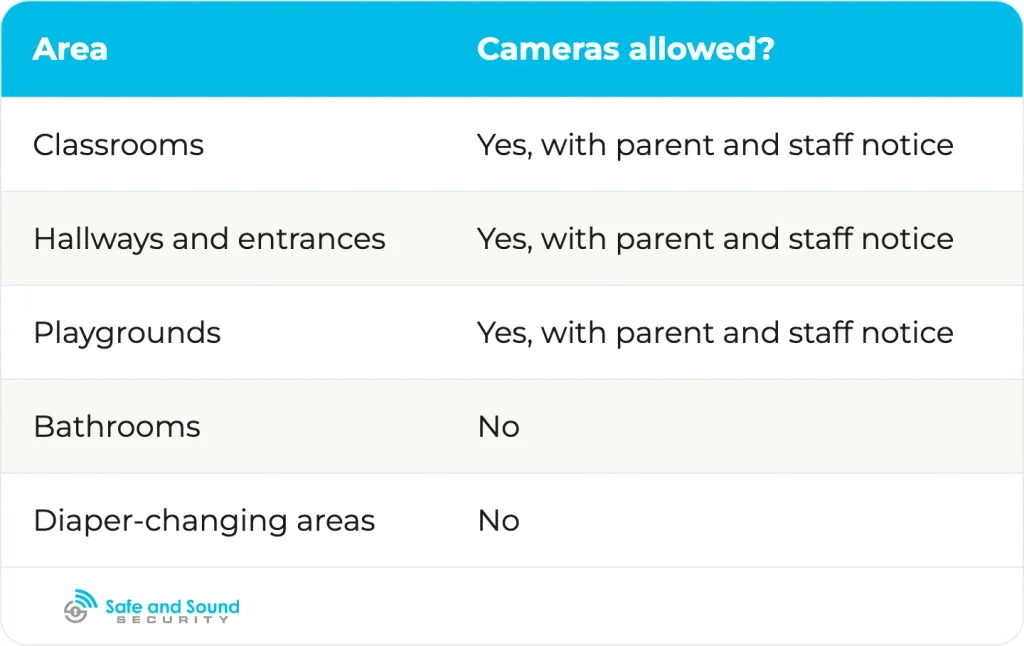
That is starting to change. Minnesota has moved to require video cameras in licensed child care infant and toddler rooms, an early sign of states shifting from allowing cameras toward requiring them, as reported by FOX 9. Because these rules are set state by state and are shifting, confirm your own state’s licensing and privacy requirements before installing classroom cameras or a parent-viewing feed.
How Much a Daycare Security System Costs
Daycare security costs scale with the number of doors and cameras and the level of integration, ranging from under $50 for a basic entry alarm to a multi-layer integrated system priced by scope. The cheapest approaches secure a single door; the most complete tie every layer together across multiple rooms or sites. Common cost tiers break down as follows.
| Approach | Typical market range | Best fit |
|---|---|---|
| Door chime or entry alarm | Under $50 | Smallest in-home settings |
| Remotely unlocked buzz-in lock | Under $200 | Single-entrance centers |
| Keypad or computer-based access system | Thousands of dollars, including installation | Multi-room, multi-door centers |
| IP camera coverage | Priced per camera installed | Any center adding surveillance |
| Integrated system (access, cameras, intercom, alarm) | Quote-based, scales with doors and cameras | Multi-site operators |
The low-end figures come from childcare loss-control guidance: a remotely unlocked lock can be bought for under $200, and a simple door chime for under $50, while keypad and computer-based systems run into the thousands, per West Bend Insurance’s loss-control specialists. Our pricing is quote-based because a two-room home daycare and a 12-room center have almost nothing in common in door count, camera count, or wiring. As of August 2026, treat any published figure as market direction, not a fixed quote.
How to Choose a Daycare Security System
Choose a daycare security system based on your center’s size, who watches the door, and whether the layers integrate. A two-room in-home program and a multi-site operator need different things, and the most common mistake is buying hardware that does not connect to the rest of the setup. Work through these questions in order:
- How many entrances and rooms need control? More doors and rooms push you from a single buzz-in lock toward a zoned access-control system with attendance by room.
- Who monitors the entrance at peak drop-off? If no one can watch a screen during the morning rush, timed access or keypad credentials matter more than a staffed video intercom.
- Do the layers talk to each other? Access control, cameras, check-in, and alarms should share one platform so a revoked credential, a camera view, and a sign-in log line up. Disconnected tools are where custody and evacuation gaps appear.
- Is the installer brand-agnostic and licensed? A contractor tied to one product line will fit you to their catalog. One that installs across platforms fits the system to your building. Integrated wiring under a single structured cabling backbone keeps it maintainable.
- Are you buying with grant or public funds? Nonprofit and publicly funded centers follow specific purchasing and grant-reimbursement processes. Our approval on 15+ government procurement vehicles is a credibility signal that helps qualifying public buyers shortlist an installer, and our familiarity with grant documentation helps nonprofit centers that front the cost and file for reimbursement.
Our camera installation at Bethany Christian Preschool is one example of that childcare-adjacent work, with the cabling run back to a single headend and tied into the site’s existing network. On a full build, the same single-contractor model extends to access control, intercom, alarms, and fire, so the layers are designed to work together instead of bolted on later.
Frequently Asked Questions
Do daycares keep their doors locked?
Yes. A well-run daycare keeps its main entrance locked 24/7 and admits visitors through a video intercom or keypad. Staff verify each person before releasing the door, which keeps the entrance controlled without leaving it propped open during busy drop-off and pick-up windows. Interior doors to infant and toddler rooms are often secured separately as well.
Is it legal to have cameras in daycare rooms?
Yes, cameras are legal in daycare common areas such as classrooms, hallways, and playgrounds, provided parents and staff are notified. They are not permitted in bathrooms or diaper-changing areas. A small number of states have begun to regulate or require cameras in specific rooms, so confirm your state’s licensing and privacy rules before installing them or offering a parent-viewing feed.
What is the best childcare management system?
Childcare management software such as Procare and Brightwheel handles attendance, billing, and parent communication, while a security system handles the doors, cameras, and emergency response. The two are separate tools that work best when integrated, so the check-in log connects to the access control and camera layer rather than running on its own.
Why don’t daycares have cameras?
Some daycares skip cameras because of cost, staff-privacy concerns, and the absence of a universal mandate requiring them. Classroom cameras also raise consent questions for staff and families. Adoption is rising as hardware gets cheaper and a few states move to require cameras in certain rooms, so the gap is closing.
The Bottom Line
A daycare security system works when its seven layers act as one: access control and intercom decide who gets in, cameras and pick-up verification confirm identity and movement, and panic, lockdown, and fire-safe egress handle the worst moments. The layer that sets childcare apart is pick-up verification, and the requirements that shape the whole system come from state licensing, CCDBG background-check law, and a growing set of state camera rules rather than any single federal standard.
Safe and Sound Security designs and integrates commercial and government security systems nationwide, and a childcare center’s daycare security systems can draw on that same capability: one contractor handling surveillance, access, intercom, alarms, and fire, backed by Verkada Platinum partnership, NDAA-compliant options, and approval on 15+ government procurement vehicles. If you are planning or upgrading a childcare center, contact our team to design a system around your building and your license.


